Are you looking for an alternative to AnyTrans because it didn’t work for you? If you consider the app to be too expensive, or you’re concerned about your privacy, there’s still a way to manage your iPhone data as you wish. I gathered the most popular and trusted apps and compared them to AnyTrans. There are even free AnyTrans alternatives! AnyTrans by iMobie is a multifunctionnal tool, so I divided the article according to the most popular features. You can go directly to the desired feature and check out the alternatives. I also give an overall comparison at the end of the article — go through it as well.
- Photo Transfer and Management
- Music Transfer and Management
- WhatsApp and SMS Transfer
- App Transfer and Management
- iPhone Backup and Restore
Check out also Comparison of user reviews — CopyTrans vs AnyTrans
AnyTrans Alternative to Transfer and Manage Photos
| Transfer iPhone photos and videos to Windows | Transfer photos and videos from Windows to iPhone | Conversion from HEIC to JPG | Preview Photos and Videos | Delete Photos and Videos | Transfer Albums to PC | Create Albums on iPhone | Live Photo Export | |
| CopyTrans Photo |
Yes Via USB cable |
Yes | Yes | Yes | Yes | Yes | Yes |
Yes They transferred as a photo + a video so that you can import them to another iOS device as a Live Photo |
| CopyTrans Studio |
Yes Via USB cable or Wi-Fi |
No | Yes |
Yes Even Live Photos in Motion |
Yes | Yes | No |
Yes They transferred as a photo + a video |
| iTunes | No | Yes | No | No | No | No | No | No |
| iCloud Photos should be synced with iCloud |
Yes Via Wi-Fi |
No Only photos in JPG |
Yes | Yes | Yes | No | Yes |
Yes They transferred as a photo + a video |
| CopyTrans Cloudly Photos should be synced with iCloud |
Yes All iCloud Photos in one go, via Wi-Fi |
Yes | No | Yes |
Yes All iCloud Photos in one go |
Yes | No |
Yes They transferred as a photo + a video |
None of the alternative tools makes it possible to do a direct transfer of the photo library from one iPhone to another or from an Android to an iPhone. So, consult the articles that will explain:
“How to Transfer Photos from iPhone to iPhone”
“How to Transfer Photos from Android to iPhone”
Every tool in the table is unique and has its pros and cons. I described each of them below.
CopyTrans Photo
It’s the closest alternative to AnyTrans for photo and video management.
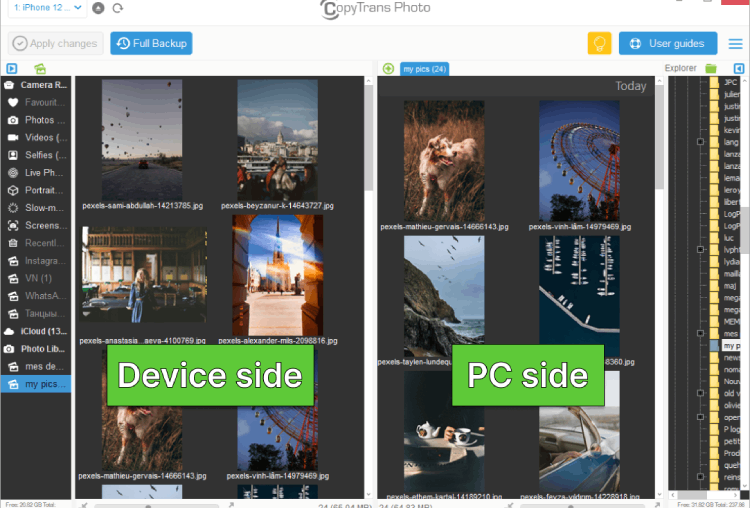
Install it on your Windows PC and connect your device to the computer using a USB or Type-C cable. You can easily drag and drop photos and videos between your PC/ external hard drive and iPhone using the app interface. But note that:
- iCloud photos are not supported
- Albums you create via CopyTrans Photo can’t be modified on the iPhone
- You have 50 free trial actions, the full 2-year license costs 19.99 USD
- No connection over Wi-Fi. You have to connect your iOS device to your PC using a cable
CopyTrans Studio
Fresh from the oven. The app was released not so long ago, and the developers keep adding new features. The huge advantages are:
- Integrated photo viewer for all Apple tricky formats
- 3 full backups of the Photo Library per day are free
- Automatic Photo Library backup
- One can change file naming options before the transfer
- Easy drag and drop to any folder and even an external hard drive
- Only transfer from iPhone to PC is available — you cannot add photos or videos to iPhone
- iCloud photos are not supported
- Smart albums that the app can create are shown only on the PC and aren’t copied to the iPhone
- You have 50 free trial actions per day for the HEIC to JPG conversion and transfer by drag and drop. A yearly subscription is 19.99 USD, while a monthly one is 4.99 USD. You can cancel the subscription anytime.
This is what the interface looks like. Yes, it’s almost like a normal Windows folder. Install it on your Windows PC, then connect your iPhone using a USB or Type-C cable. You can also set up a connection via Wi-Fi.
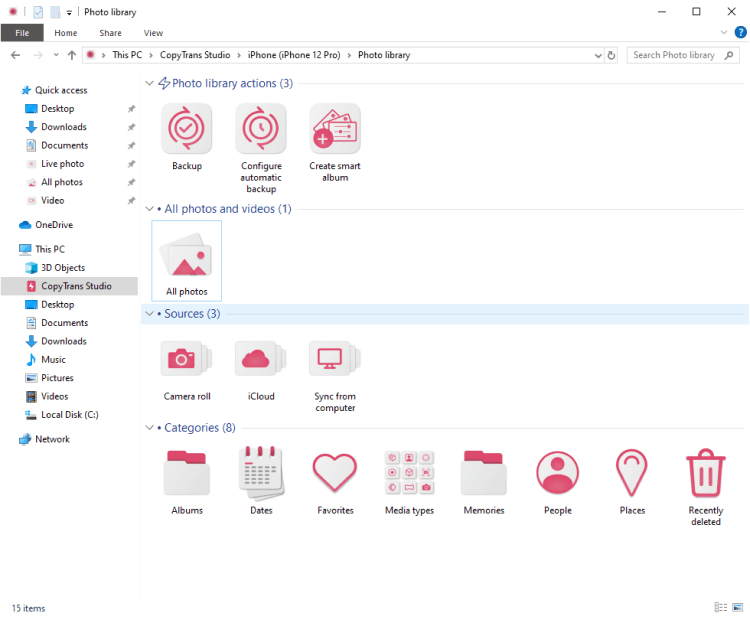
To move your entire photo library to a folder on your PC or an external hard drive for free, click on “Backup”.
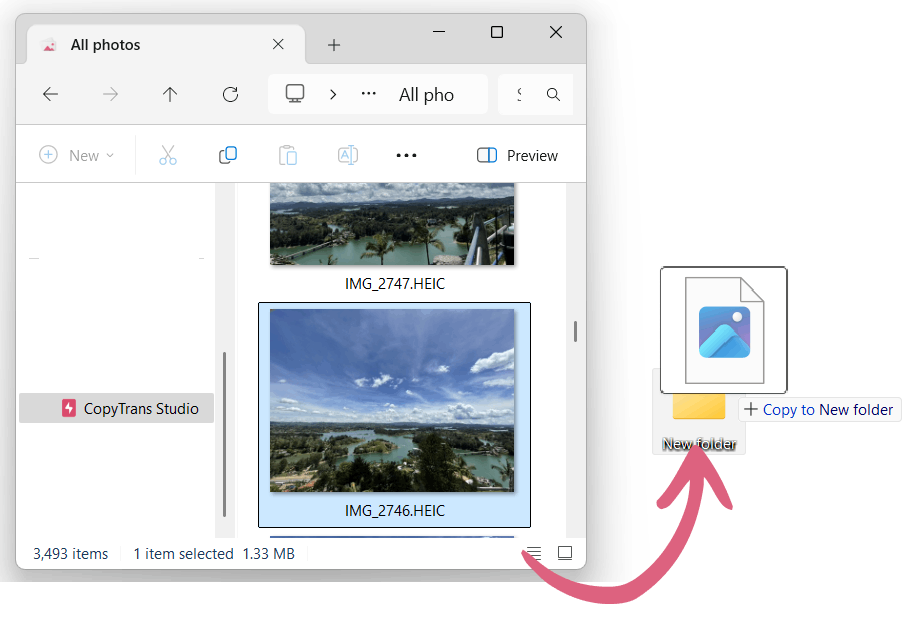
If you wish to copy over a few files only, simply open the “All Photos” album and drag-and-drop the files to a folder of your choice.
iTunes
It’s the only tool that is totally free. You can download iTunes from the Microsoft Store. One has to connect the iPhone to the PC, launch iTunes, and sync a folder on the PC with the device.
- Only the transfer from PC to iPhone is possible
- The album created via iTunes can’t be modified from the iPhone
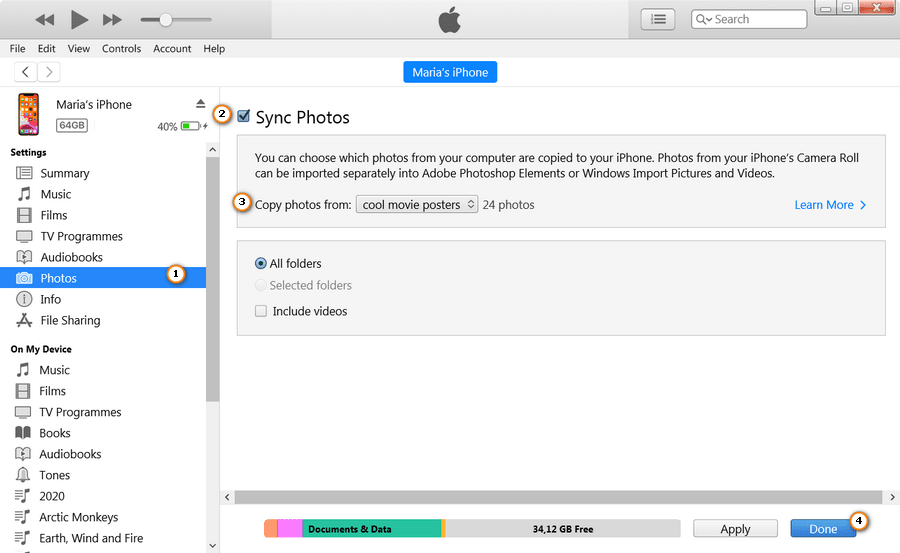
TIP: you can also use a new Apple app for Windows called “Apple Devices”. It works the same way as iTunes. Learn more in the article “Apple’s apps for Windows: 3 new apps on test” .
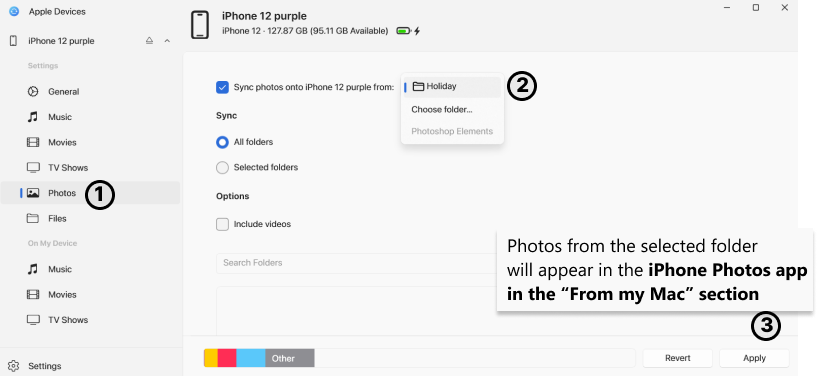
iCloud
You can sync your iPhone/ iPad photo library with iCloud and then use the online icloud.com version to download or upload files.
- You can upload only JPG photos to your iCloud/ phone
- The free space is limited to 5GB, but you can purchase more storage
- It’s an online storage — make sure you’re not uploading sensitive data
That’s what you see when you enter icloud.com. Open your photos.
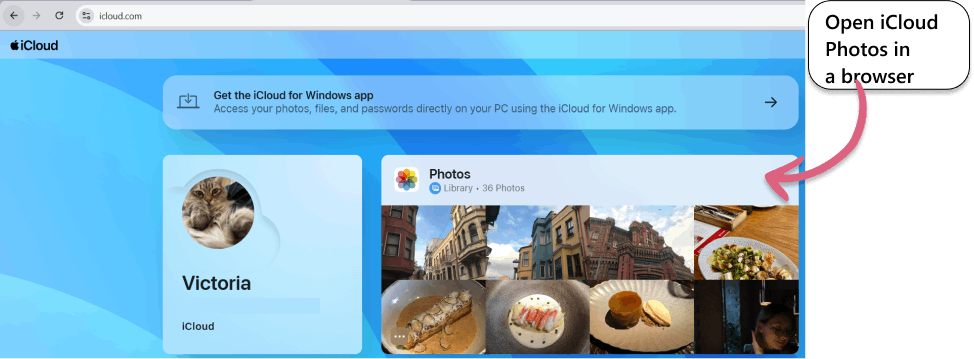
You can then download or upload photos by clicking on the cloud icons in the upper-right corner on the screen.

CopyTrans Cloudly
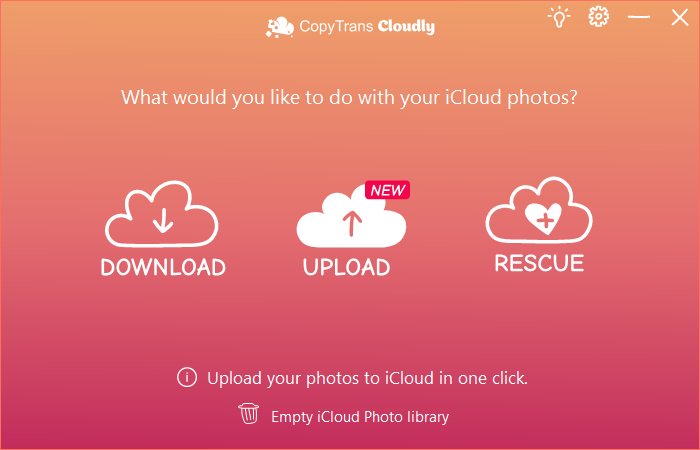
CopyTrans Cloudly is an app for Windows. No need to connect the iPhone to the PC, because the software connects directly to the iCloud account.
It allows one to overcome several icloud.com limitations:
- The connection is secured by SSL encryption, so it’s safe
- None of your data is sent to any server. All the information stays on your computer without further access to third-party tools
- Download or delete your entire iCloud Photo Library in one go
- Recover deleted iCloud photos, even those that are no longer in the “Recently deleted” album
- Add videos and photos to iCloud
- It’s not free. A 2-year license is at 19.99 USD
- Impossible to select photos to transfer to a PC, only the backup of the entire library is available
The app is intuitive. You should simply click on the function that you need and select the folder.
AnyTrans Alternatives for Music Transfer and Management
| Export songs from iPhone | Import music to iPhone | Support purchased music | Modify artwork, play counts, rating, etc | |
| CopyTrans Manager | No | Yes | No | Yes |
| CopyTrans | Yes | No | No | No |
| Apple Music | No | Yes | Yes | No |
| CopyTrans Filey |
Yes From installed third-party apps only |
Yes To installed apps only |
No | No |
None of the alternative tools can transfer the music library from one iOS device directly to another. You should first copy your music library to a computer, and then import the music files to another iPhone. You can find more explanations in the article “How to Transfer Music from iPhone to iPhone” .
AnyTrans by iMobie is also known for its function to create customized ringtones. Unfortunately, the mentioned alternatives can’t do that. However, you can do it in a few steps on your Windows computer for free. Follow the instructions “How to Make a Ringtone for an iPhone“.
CopyTrans Manager
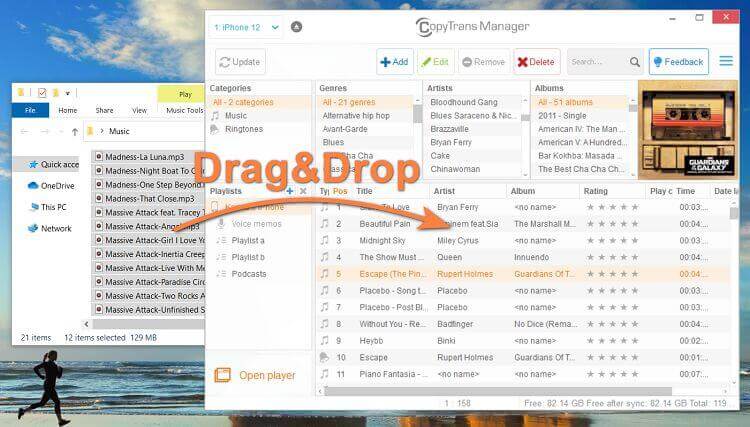
CopyTrans Manager is a totally free AnyTrans alternative. It can add music, audiobooks, ringtones, movies, and podcasts to your iPhone/ iPad/ iPod.
- Simple to use
- It’s free
- One can create new albums and populate them with songs
All you need to do is to connect your iOS device to your Windows computer with a cable, launch CopyTrans Manager, and drag and drop the music files to the main window.
CopyTrans
This app has only one function — it can export your iPhone/ iPad/ iPod music library to a folder or to iTunes. However, other tools are not able to do that, so it’s quite unique. What makes it special as well is that you can export your music library directly to an external hard drive or a USB stick.
- Simple to use
- Works even for old iPods
- It can copy music from your device to iTunes, an external hard drive, or a folder on your PC
- It’s not free — a 2-year license is at 19.99 USD
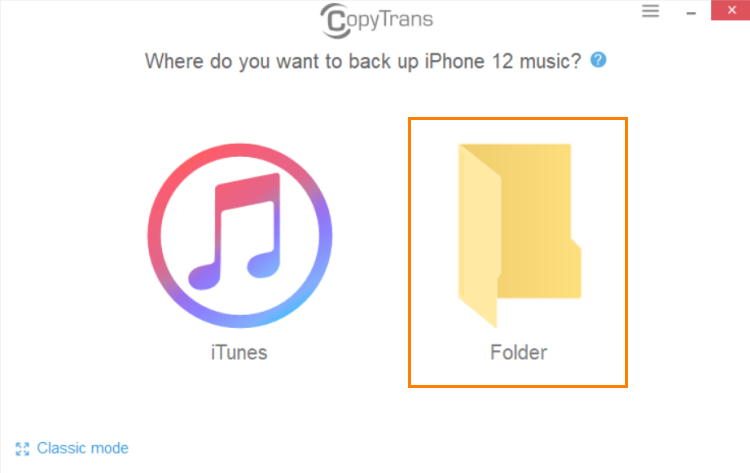
The software is user-friendly. If you want to back up your entire music library in one go, simply select the destination folder.
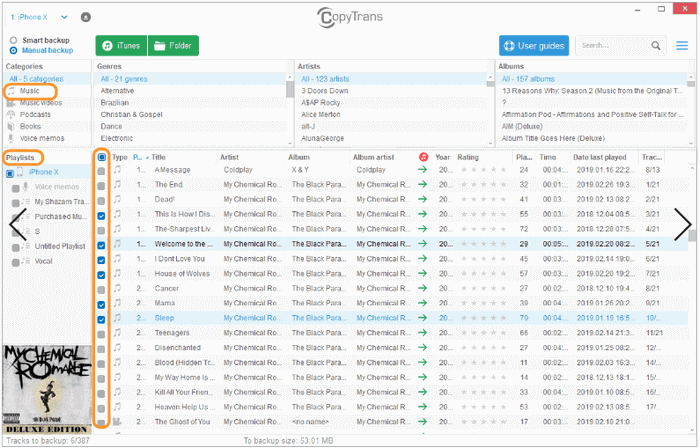
If you want to move only a couple of songs, open the classic mode in the lower-left corner. Select the songs and click on “Folder” on top.
Apple Music
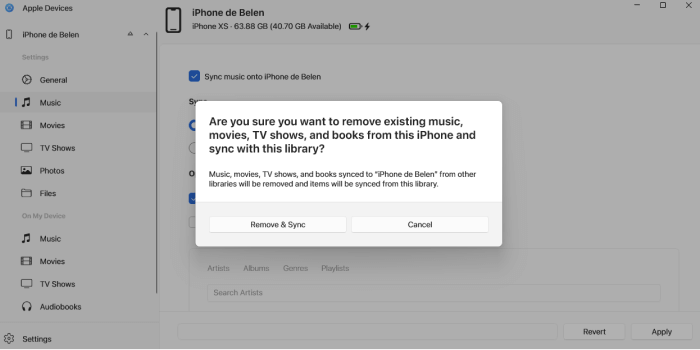
Apple has replaced iTunes by a new Music app (to learn more, read the article “Apple’s apps for Windows: 3 new apps on test“). You can install the app from the Microsoft Store. However, the procedure is not that simple. One has to use the Music app to add music from the PC, and then sync the tracks with the iPhone via Apple Devices, another new Apple app.
- It’s free
- One can also buy music
- As tests showed, it doesn’t always work correctly on Windows
- Complicated to use on Windows
First use Apple Music to add music files from a folder or a CD to the app.
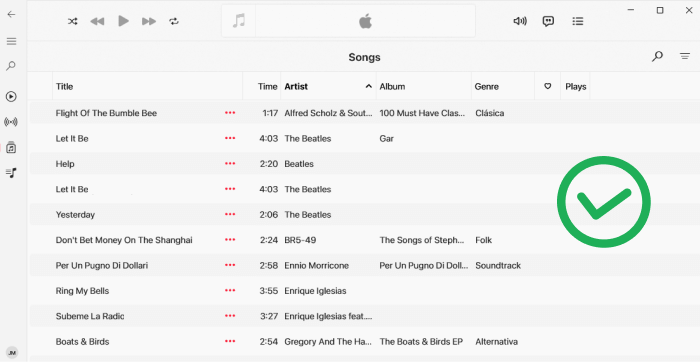
Then connect your iPhone to the PC and use the Apple Devices software to sync your device with the new music library. Note that the music library on your iPhone will be completely replaced by the one shown in the Apple Devices. If you have more songs, books, movies on your iPhone, they will be erased.
CopyTrans Filey
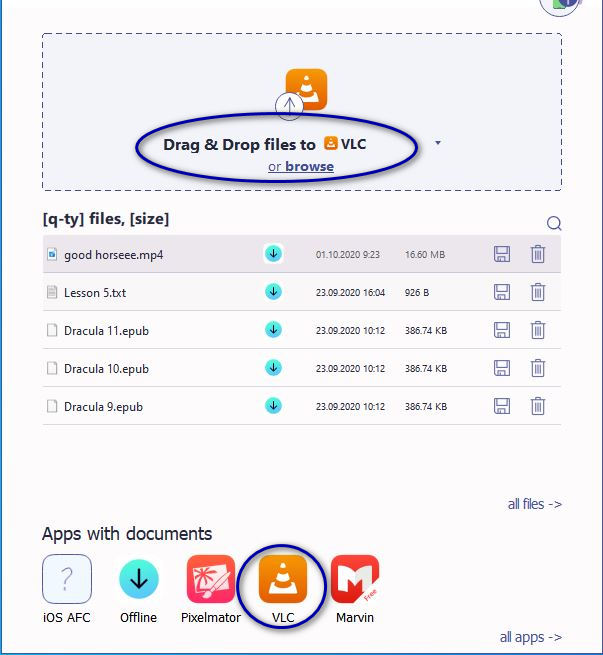
It’s a totally free AnyTrans alternative as well, but it works only with third-party apps installed from the App Store. So, CopyTrans Filey is just right for you if you don’t like using the native Music app on your iPhone/ iPad.
- It’s free
- Works by drag and drop — easy to use
- Only for 64-bit PCs
The app is easy to use. You have to connect the iOS device to the computer using a USB/ Type C cable (you can then set up connection via Wi-Fi) and launch CopyTrans Filey. Select the app you use to listen to music in CopyTrans Filey. Then drag and drop music files from the PC to the app. For the transfer from iPhone to PC, click on the floppy disk icon.
Alternatives to AnyTrans that can transfer and export messages
| Save messages to PC | Back up and restore messages | Preview chats | Direct transfer between iOS and Android | Support iMessages | |
| CopyTrans Contacts | Yes | No | Yes | No | Yes |
| CopyTrans Shelbee | No | Yes | No | No | Yes |
| CopyTrans Backup Extractor |
Yes From backups only |
No | No | No | Yes |
The alternative apps cannot print the messages directly from an iPhone or iPad. One should first save the messages to the PC and then print them. You can find more instructions in the separate article “How to Print iPhone Messages on Windows” .
If you are switching from Android to iPhone, please use Move to iOS. If you want to transfer your iPhone data to a Samsung phone, opt for Smart Switch.
I decided not to include such native tools as iCloud and iTunes (Apple Devices) in the table because they’re not flexible enough. They can only make a full backup of your iPhone or iPad and then make a full restore to another iPhone or iPad. It means that the data on the restored device will be totally replaced. You can’t select data for the transfer.
CopyTrans Contacts
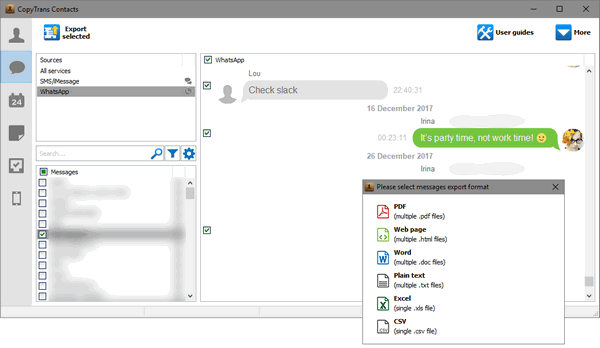
If you’re looking for a solution to export your messages, including WhatsApp, Line, and Threema in a readable format, you can use CopyTrans Contacts. The app can export your conversations in different formats, but I recommend selecting the “Web page format (HTML)” because it’s the most compatible one.
- All the attachments are also saved to a separate folder in their original format
- You can open the messages even if you didn’t read them on your iPhone, and they will stay unread on your device
- Impossible to import the messages to another iPhone/ iPad later
- The first loading can be slow if your device has a lot of data
- It’s not free. A 2-year license is at 19.99 USD.
All you need to do is install the app on your Windows PC, connect your iPhone/ iPad to the PC and wait until the loading is finished. You can then select and export the messages.
CopyTrans Shelbee
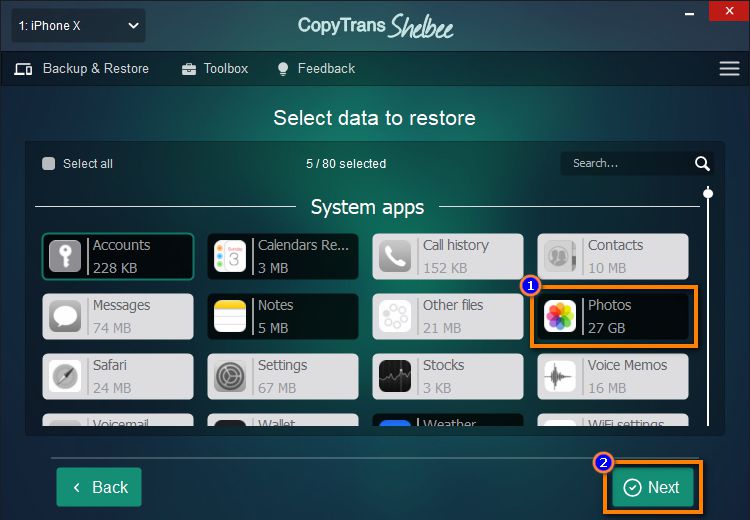
The app can make a full backup of your iOS device and then restore only your messages or messaging apps to the same or another iOS device. The features of full backup and full restore are totally free. However, if you want to use the custom restore feature, it’s not free.
- The full backup and full restore features are free
- The backup to an external hard drive is a free feature
- The app can even restore files from an iTunes backup
- The custom restore is included in the full version, which costs 19.99 USD for 2 years
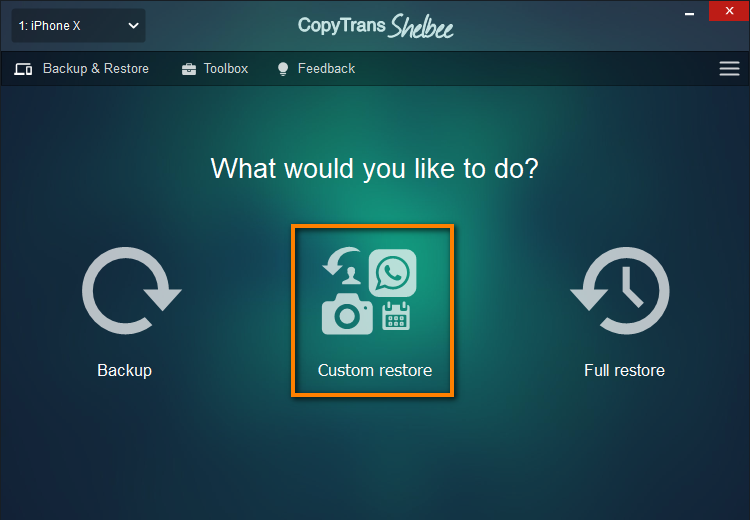
To use the app, you should install it on your computer — nothing is installed on your iPhone. Then connect your iPhone to the computer with a USB cable. If you use a Type-C cable, the progress will be faster. You need to make a full backup of your iPhone to a folder or an external hard drive. You won’t be able to read the content of the backup on your computer because it’s encoded for further restore.
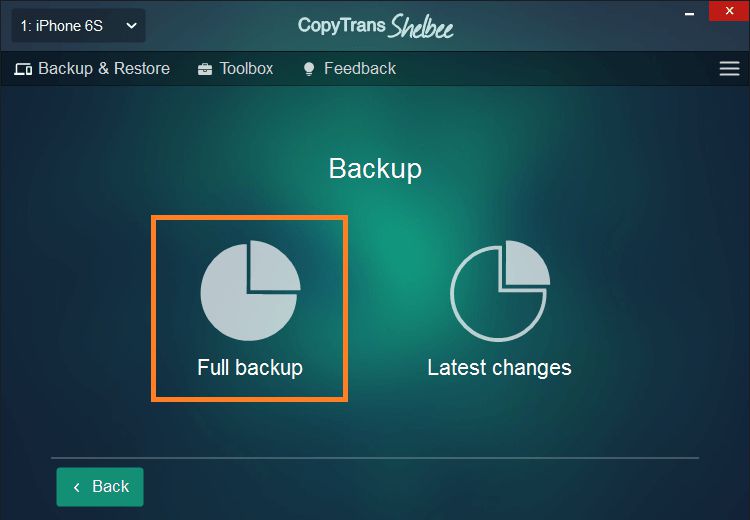
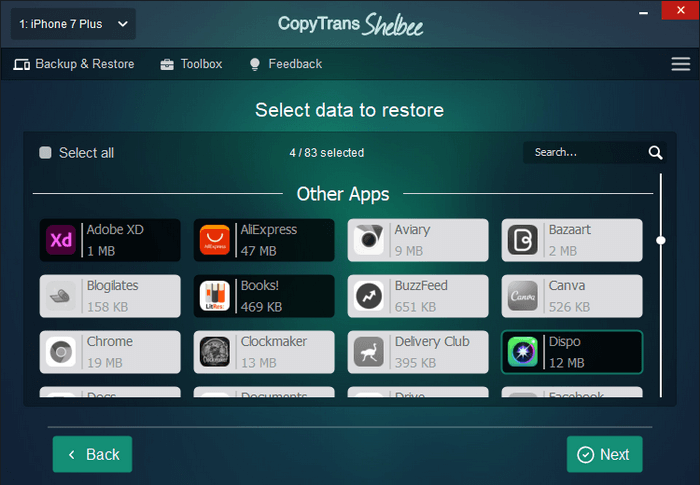
Then connect your other iOS device and make a custom restore of the messages or messaging apps of your choice.
CopyTrans Backup Extractor
In comparison to the apps above, CopyTrans Backup Extractor works directly with your backups, not with the iPhone/ iPad data. So, you’ll be able to recover your messages and conversations from messaging apps even if your iPhone is not working anymore.
- No need to connect the iPhone to the PC
- The software finds backups automatically
- All the attachments are also saved to a separate folder in their original format
- It’s not free. A 2-year license is at 19.99 USD.
- Impossible to restore extracted files to another device
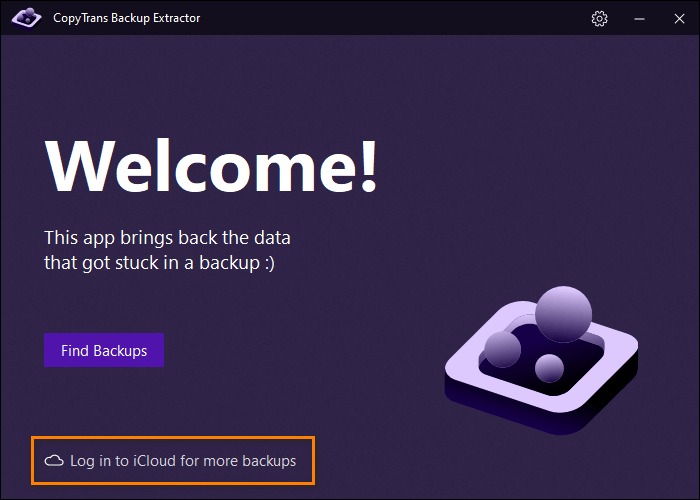
Install the software on your PC, and it will automatically find your local iPhone/ iPad backups. You can also connect to your iCloud account so that the app shows iCloud backups as well.
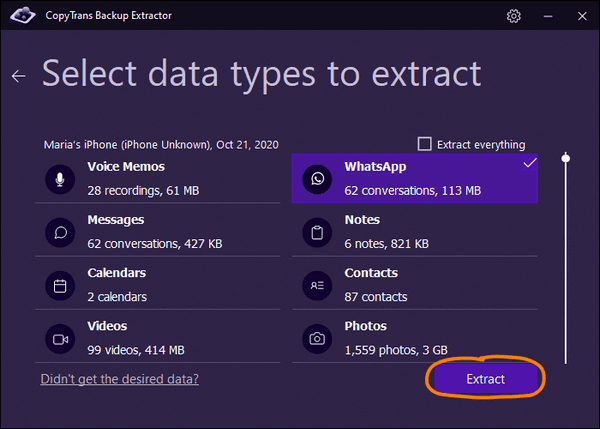
Then export the messages to a folder in a readable format. You can further share or print your exported messages.
Download CopyTrans Backup Extractor
AnyTrans Alternatives for App Transfer and Management
| Direct transfer from one iPhone to another | Restore only selected apps | Restore the app even if it was deleted from the AppStore | Transfer files from installed apps to a PC | |
| CopyTrans Shelbee | No | Yes |
Yes Can also restore apps that are blocked in the country but still available on the AppStore |
No |
| iCloud | Yes | No |
No Can restore apps that are blocked in the country but still available on the AppStore |
No |
| CopyTrans Filey | No | No | No | Yes |
The alternatives cannot offer you full management of your iPhone apps. They cannot delete, update, or downgrade your iPhone apps on a Windows PC. But they can transfer the app data to another iOS device or a computer.
CopyTrans Shelbee
This tool can make a full backup and restore — the same as iTunes, Apple Devices, or iCloud. But the huge advantages of the software are the possibility to save app data and make a custom restore of selected apps only. It means that you can back up the apps when they are still in the App Store and then restore them even if they are deleted from the source.
- Make a full iPhone backup to an external hard drive if you don’t have much space on your PC
- Restore only the apps and data of your choice
- Save the apps when they are still in the App Store to be able to restore them when they are deleted from the source
- It’s not free. A 2-year license is at 19.99 USD.
Install the app on your Windows computer — you don’t have to install anything on your iOS device. Connect your iPhone/ iPad to the PC with a USB or a Type-C cable. The transfer via a Type-C cable is usually much faster.
If you want to move a few apps to a new iPhone, you need to make a full backup first. You can do it for free using CopyTrans Shelbee as well. Check the article “How to Back Up iPhone” if necessary.
All you need to do next is to connect your new iPhone/ iPad to the PC and click on “Custom restore” (not a free feature). You’ll be able to select the apps to transfer from the backup you’ve previously done.
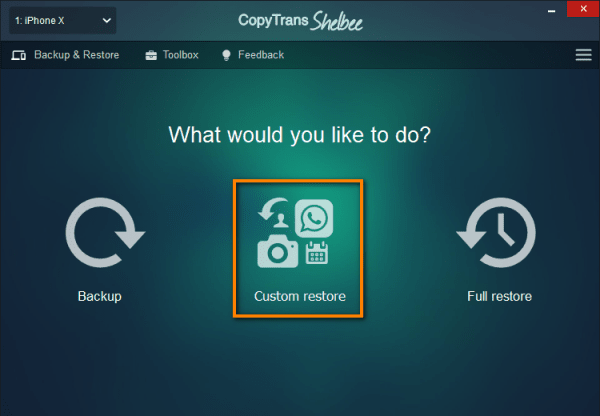
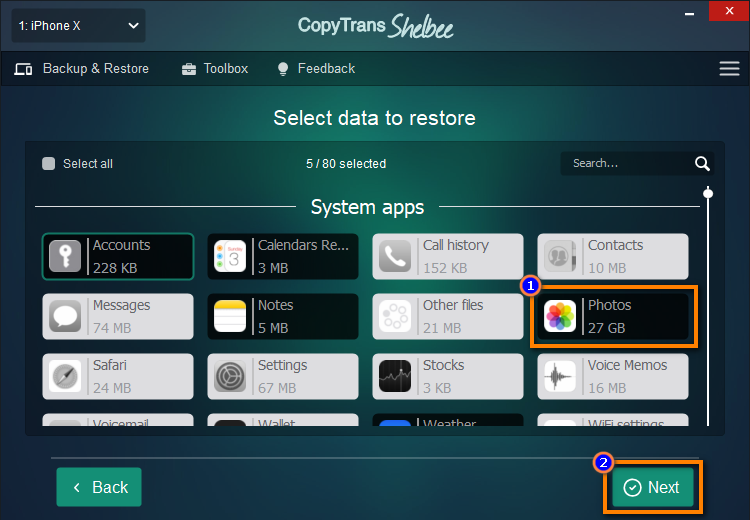
CopyTrans Shelbee can do a selective restore even from an iTunes backup. But please note that iTunes doesn’t save app data, so the apps will be automatically reinstalled from the App Store after the restore.
Download CopyTrans ShelbeeiCloud
iCloud doesn’t offer the flexibility of CopyTrans Shelbee. However, it is an alternative to AnyTrans that can also make backups and restores wirelessly. If you don’t have a computer or a cable, you can opt for this solution.
- The backup and restore are made wirelessly
- It’s a 100% Apple native solution
- It’s free only for 5GB. If your iPhone has more than 5GB of data, you have to pay for the extra storage monthly.
- There’s no option to make a custom restore of apps — only full restore is available
- The destination device has to be new or reset. The iCloud restore can only be made upon initialization.
If you’re not afraid of the inconveniences, especially if you didn’t initialize your new iPhone yet, here’s how you should proceed.
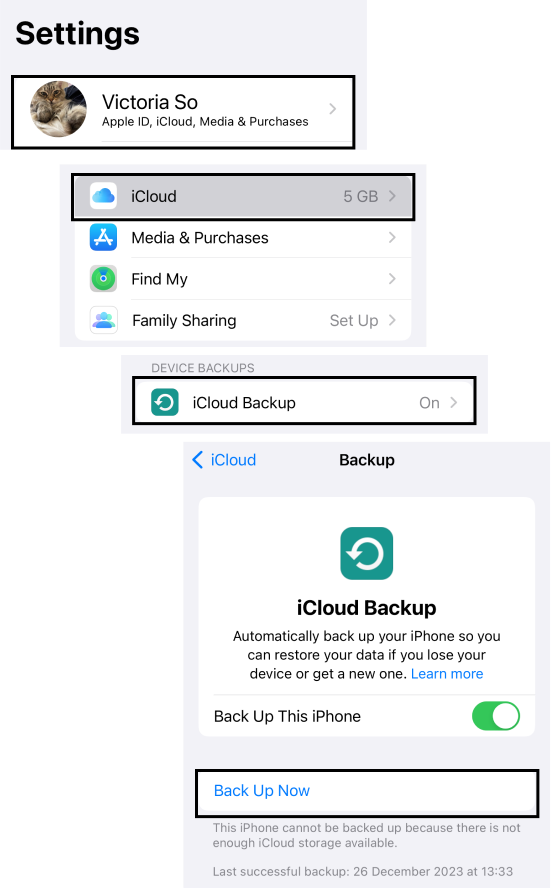
Go to the iPhone settings -> your Apple ID account with a picture on top -> iCloud -> Backup iCloud -> Activate it to save your iPhone data.
When it’s done, you can restore the backup to another iPhone.
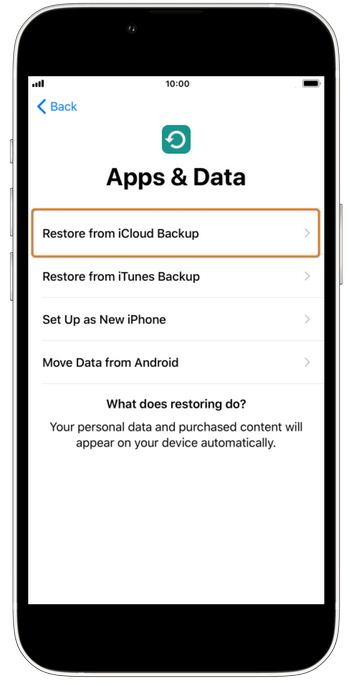
Start your new or reset iPhone. Follow the instructions Apple offers to set up your device. When you’re offered to move data from another iPhone, select “iCloud”.
CopyTrans Filey
If you install apps from the App Store to manage documents, listen to music, watch movies, you can find CopyTrans Filey pretty useful.
- It’s free
- Works by drag and drop — easy to use
- Only for 64-bit PCs
- Cannot extract files from the Apple native apps
Install the software on your Windows PC and connect your iPhone/ iPad to the PC with a cable. You will see all the installed third-party apps and the documents they store. Save them to your computer by clicking on the floppy disk icon.
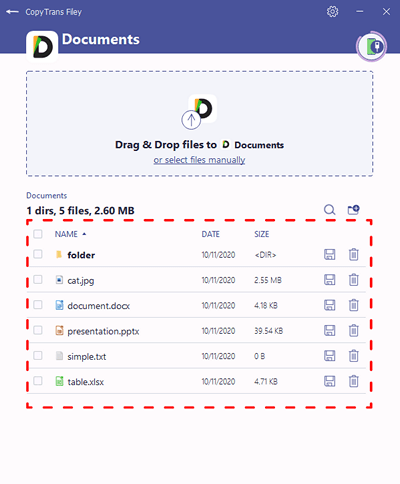
To add files from your computer to the apps, simply drag and drop the files right to the CopyTrans Filey interface.
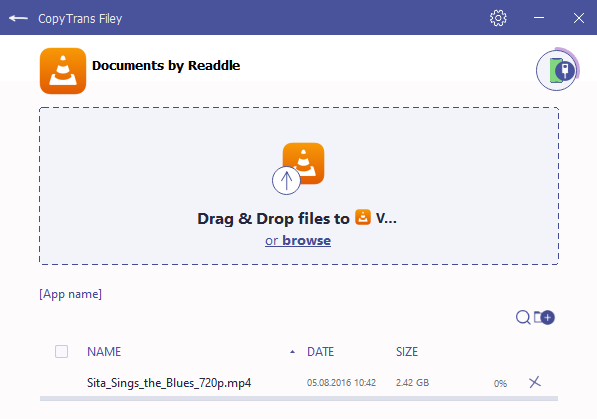
You can also enable wireless connection after the first transfer.
AnyTrans Alternative for iPhone Backup and Restore
| Include music and downloaded images | Work over Wi-Fi | Back up to PC | Back up to external hard drive | Preview data for restore | Selective restore | |
| CopyTrans Shelbee | No | No | Yes | Yes | No | Yes |
| iCloud | No | Yes | No | No | No | No |
| iTunes/ Apple Devices | No | Yes | Yes | No | No | No |
As you can see, music from the Music app and non-iPhone photos and videos cannot be copied over by the alternatives. You will have to transfer these files manually. Please see the articles “How to Transfer Music from iPhone to iPhone” and “How to Transfer Photos from iPhone to iPhone” .
If you’re looking for a way to clone your Android to a new iPhone, opt for the native solution “Move to iOS” (see the offical guide by Apple). Of course, you cannot fully clone an Android device to an iPhone because their systems are different, but I tested it, and it’s the only tool that can copy over WhatsApp conversations and turn Motion Photos into Live Photos.
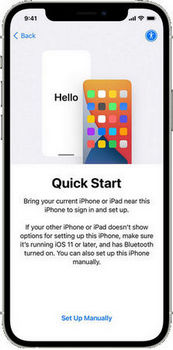
If you’re switching to another iPhone, it’s easy to clone one device to another upon setup using the “Quick Start” feature. Apple will offer you the possibility to transfer data via Wi-Fi from another iPhone. The data will be fully cloned to the new device. See the official instructions on the Apple website.
CopyTrans Shelbee
This app can be installed on a Windows PC only. The iPhone/ iPad should be connected to the PC with a USB or a Type-C cable. The interface is user-friendly — you only have 3 buttons to choose from.
- The full backup and restore are free
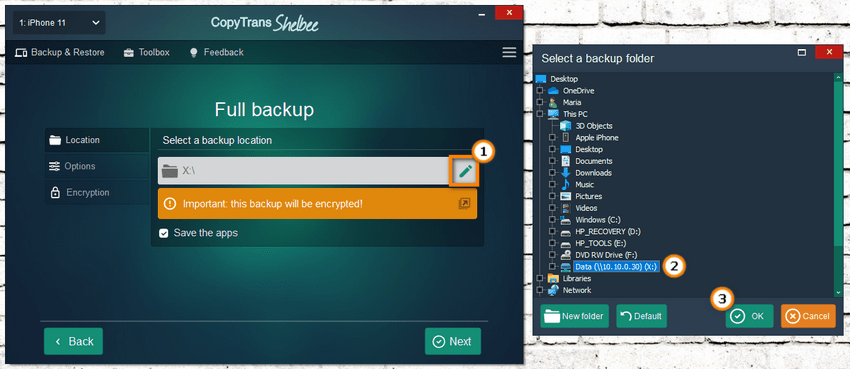
- You can select the backup folder or make a backup to an external hard drive
- You can set up a reminder not to forget to make a new backup
- The custom restore of selected files only is not a free feature. A 2-year license for the app is at 19.99 USD.
- No wireless backup
You can make the backup to a folder of your choice or even to an external hard drive.
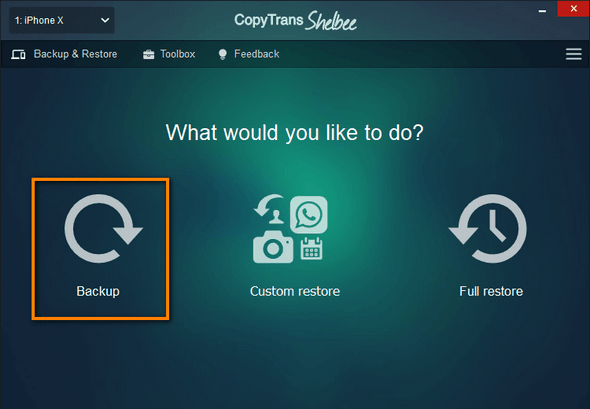
As for the restore, you can make a full restore for free or purchase a full license and make a custom restore.
iCloud
iCloud is a secure way to make a backup and a restore wirelessly. The backup is made automatically when your iPhone is connected to Wi-Fi.
- Only your device and Wi-Fi connection are needed
- You have to reset your iPhone to restore the iCloud backup
- Only 5GB of storage are free. If you have more data on your device, you need to pay a monthly subscription
- It’s an online storage
To make a full backup of your iPhone or iPad, you simply have to enable the iCloud Backup in your iPhone Settings -> Apple ID profile with a photo -> iCloud.
However, the procedure is a little more tricky for the restore. It’s possible to restore an iCloud backup only to a non-initialized iPhone. So, if you already set up your new iPhone or iPad, you’ll have to reset it completely. You will be offered to restore an iCloud backup upon the iPhone initialization and setup.
iTunes/ Apple Devices
iTunes or Apple Devices are good native tools that can back up your iPhone or iPad to your PC. Apple Devices was created as a replacement for iTunes, so the apps are almost identical. You can install iTunes or Apple Devices from the Microsoft Store. If you install both, only Apple Devices will be able to make the backups and restores. So, better install one of them.
- Totally free
- You can’t select the backup folder. How to find the iTunes/ Apple Devices backup location?
- You won’t be able to make a backup if you don’t have enough storage on your PC
- Only a full restore is available, which means that all the data on the device will be replaced by the data of the backup
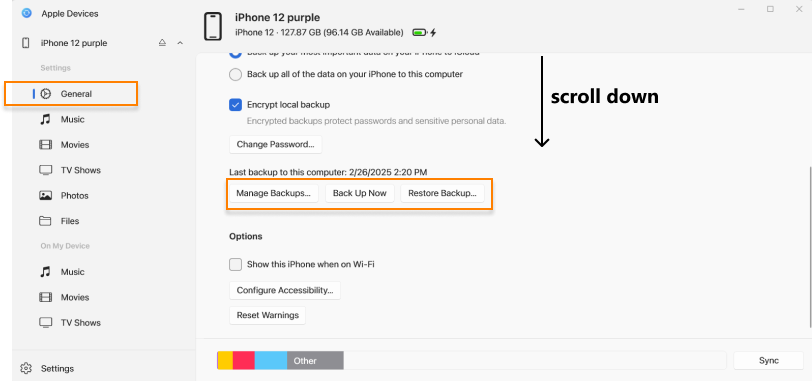
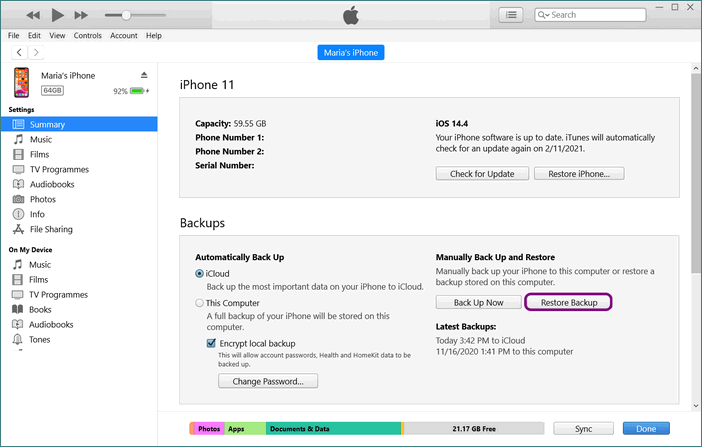
The backup and restore process is easy. You connect the iPhone/ iPad to your PC with a USB or Type-C cable and click on “Backup Up now” in the interface of iTunes or Apple devices.
When the backup is done, disconnect your iPhone/iPad. You can restore the backup to another iPhone/iPad by clicking on “Restore Backup”
In Apple Devices
In iTunes
Reviews AnyTrans vs CopyTrans
I’ve analyzed reviews for AnyTrans and CopyTrans on their official websites, TrustPilot, different social media, and here’s what I discovered.
Customer support
AnyTrans – The customer support is slow and doesn’t always reply. So, it’s complicated to resolve issues fast and consider refund.
CopyTrans – Users often say that the customer support is very fast and efficient. The team tries to reply to all online reviews.
Wireless connection
AnyTrans – The connection over Wi-Fi doesn’t always work.
CopyTrans – Only CopyTrans Filey and CopyTrans Studio work over Wi-Fi. Users don’t complain often.
Security
AnyTrans – People find it confusing to enter all their existing passwords in the app.
CopyTrans – There are not many complaints about that. Probably because every connection is secured by SSL protocol and no data is sent to servers.
Speed of transfer
AnyTrans – Not many complaints about the app being slow. The users either complain that it simply doesn’t work at all or are happy that it helped.
CopyTrans – Users say that the apps (except CopyTrans Filey and CopyTrans) are often slow. It is true if a device has a lot of data.
Price
AnyTrans – A lifetime license is expensive.
CopyTrans – The full license is cheaper, but it’s offered for 2 years. It should cause no issues if you don’t update your iOS and iTunes. That way, you can keep using the versions available to you without having to renew the license.
Paid features
Many users complain that they download AnyTrans or CopyTrans, and it happens to be paid. Another unpleasant context is that users purchase the apps without testing them and discover that the feature they were looking for is not present. That’s why I strongly advise you to try the trial versions before you buy, look for answers on the official websites or ask ChatGPT, contact the Customer Support team and ask your questions.
So, both tools have a mix of positive and negative reviews. CopyTrans seems to have more favorable reviews when it comes to the music and photo management of the iPhone/iPad/iPod on Windows. AnyTrans has more functions, including file transfer between iOS and Android or Mac support, so there are more “it didn’t work” reviews.
Conclusion
If you only need a tool for basic tasks like moving some music and photos from iPhone to PC and vice versa or doing backups, CopyTrans has the most user-friendly and convenient tools. What’s more, CopyTrans is offering a discount for all their tools. So, you can purchase a license for 7 apps at 29.99 USD for 2 years!
If you are looking for full-device management on PC, you need to purchase a license either for AnyTrans or CopyTrans. Always test the exact feature you need in the trial version before paying!
However, CopyTrans offers some genuinely “free” alternatives. For example, you can move music from a folder or a CD to your iPhone, add documents to your device, or make full backups and restores totally for free with CopyTrans Filey, Manager and Shelbee.
Apple native tools are also pretty useful. There are even free functions. You can clone your iPhone to a new one using Quick Start upon the setup. iTunes or Apple Devices can easily back up and restore your iPhone and iPad — all you need is a computer, your device, and a cable. iCloud is a wireless and automatic way to back up and restore your iOS device, but the iCloud storage is not free.
Related articles
- Best iPhone Backup Software — 5 tools
- Software for putting pictures to music. How to change artwork on iPhone?
- Contact recovery for iPhone — 5 tools.
- Best way to save music files from iPhone to PC
- How to add ringtones to iPhone?
- How do I quickly delete thousands of photos from my iPhone ?
- What is the best free file transfer app for iPhone?
