
Updating to the latest iOS will allow you to enjoy the new features. The new version will also fix bugs and security issues of the older version. So, updating your iOS regularly is recommended.
However, there are times when you may not be able to update your iPhone. Some of you might have encountered this problem :“I got an error when downloading the update”, or “The installation process is not progressing”. You thought updating was a simple task, but it is a hassle to spend hours and hours and still not be able to install the latest iOS.
This article will show you what to do when you can’t update your iOS and what you should be aware of.
- Things to keep in mind when updating your iPhone
- What to do if you can’t update your iPhone
- What to do if an error occurs during iOS download
- Measures to take when updates cannot be checked or verified
- What to do if you cannot connect to the iPhone software update server
- How to deal with iOS update not finishing
- It shows “Checking for update” and iOS update does not finish
- Remaining time is being calculated and will not proceed
- How to cancel iPhone updates
If you are wondering about iOS 18 update, all the info is here.
Newest iPhone update
Things to keep in mind when updating your iPhone
We recommend that you prepare your device before iPhone new update. By checking the following, you can avoid the situation when iPhone software update fails in many cases.
1. Check the model of the device that supports iOS
Since you may not be able to install the latest iOS on an older device, check the iOS 18 compatible devices before updating.
iPhone models with Limited support
- iPhone XS and iPhone XS Max
- iPhone XR
- iPhone 11, 11 Pro and 11 Pro Max
- iPhone SE (2nd generation, 3rd generation)
iPhone models with Full support
- iPhone 12 and 12 Mini, 12 Pro and 12 Pro Max
- iPhone 13 and 13 Mini, 13 Pro and 13 Pro Max
- iPhone 14 and 14 Plus, iPhone 14 Pro and 14 Pro Max
- iPhone 15 and 15 Plus, iPhone 15 Pro and 15 Pro Max
- iPhone 16 and 16 Plus, iPhone 16 Pro and 16 Pro Max
It is impossible to install the latest iOS 18 on other models, so the update cannot be downloaded via “Software Update”. You can check the Apple website for other iPhone models that support iOS.
2. Check Wi-Fi connection
Updating your iPhone requires a stable Internet connection. Wi-Fi networks are faster and more stable than mobile connections. Check your Wi-Fi connection before updating.
-
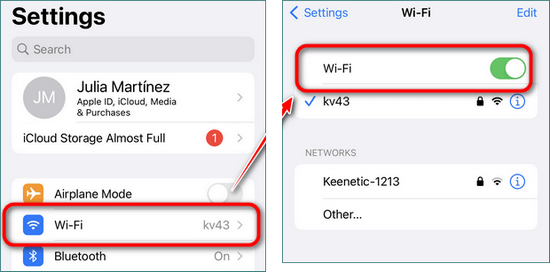
Tap Settings > Wi-Fi and make sure Wi-Fi is turned on. If it is disabled, turn it on.
-
Then select the network you wish to connect to and enter the password. Then tap “Connect”.
3. Check battery status
Since sufficient power is required to install the latest iOS, charge your device before installing the update. It is necessary to charge the battery to at least 50% to 60%.
4. Free up enough space
You must free up a specific amount of space in your iPhone storage to update your iPhone. To check your update space, go to Settings > General > Software Update.
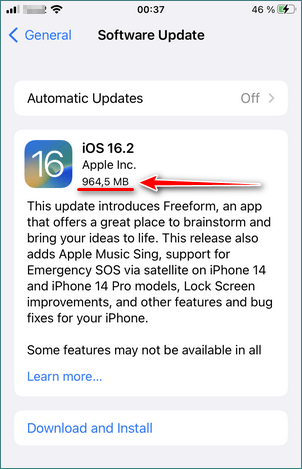
To check the free space on your iPhone, tap Settings > General > iPhone Storage.
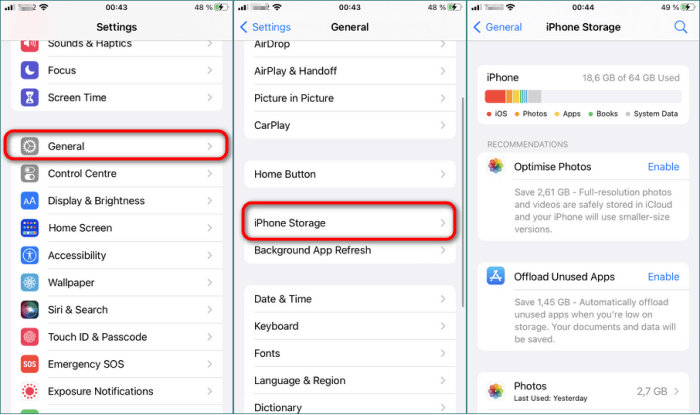
If the free space is low, delete unnecessary data. Please refer to How to free up space on your iPhone for how to increase capacity.
5. Back up your iPhone
If an iPhone update fails, data may be lost. We have also received concerns from users that some data was lost even when the iPhone update was successful. Therefore, it is important to back up your iPhone data to your computer before performing the update.
To back up your iPhone data you can use CopyTrans Shelbee, a handy tool to back up and restore your iPhone. With this program you can perform complete restores as well as individual restores.
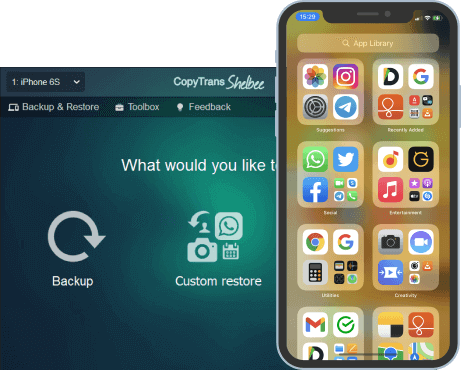
Unlike iTunes, CopyTrans Shelbee will:
✔️ do full or incremental backup;
✔️ allow to choose the folder to save backup;
✔️ validate backup made;
✔️ compatible with iTunes backup;
✔️ support encrypted iPhone backup;
✔️ restore full iPhone backup or just some selected data;
✔️ allow you to save your apps;
💡 For detailed instructions please refer to our guide on how to back up iPhone without iTunes.
6. Check how to update the software on your iPhone
If you are unable to update your iPhone, please make sure you are doing the update correctly before proceeding with the solution.
Update iPhone via OTA (Over The Air). To wirelessly update your Phone’s iOS, open the Settings app on your iPhone, go to General > Software Update and tap Download and Install. Then wait for the update to finish downloading. Then select “Install Now”.
If the update still fails after following the above steps, proceed to the following measures.
If your iPhone shows the message “iPhone attempting data recovery” and it is stuck, then we advise you to check the article on how to fix the issue.
iPhone won’t update
What to do if you can’t update your iPhone
The problem of not being able to update your iPhone can be caused by a variety of reasons. The main causes are errors during the update process and too long update time.
If the update fails, first check the status of Apple’s servers on Apple’s “System Status” page. Sometimes Apple’s servers are not working due to maintenance, glitches, or other reasons. So, it is recommended to check if the problem is on Apple’s side before proceeding to the next step.
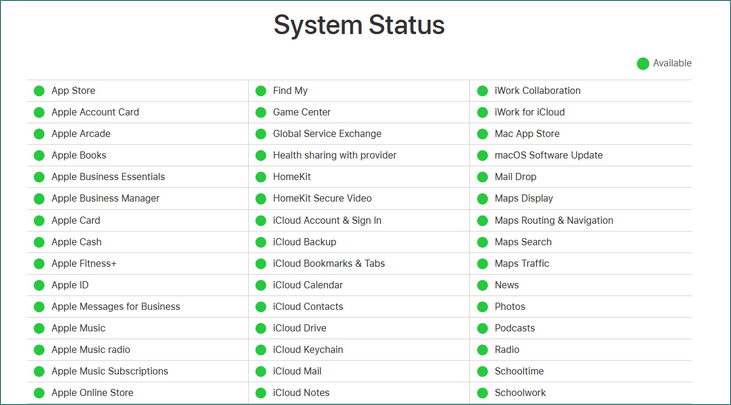
If a service is marked in yellow, it means that there is a problem with the Apple server. Tap on that service to see the details.
If it is a problem with Apple’s servers, you will have to wait.
What to do if an error occurs during iOS download
If you get an error like the one below, it will be impossible to update your iPhone.
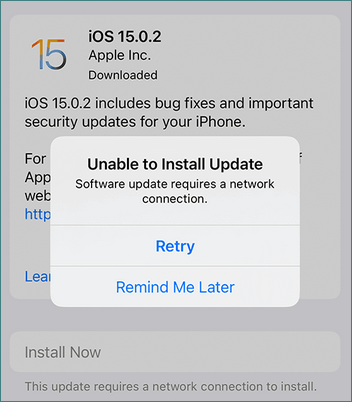
Main causes of errors during download or installation:
- Not enough free space to download iOS
- Download is taking too long
- Update file is corrupted
- Wi-Fi connection is unstable
- iPhone cannot connect to the update server
You can try the following remedies to fix the problem Remember to make a backup of your iPhone before downloading the update.
1. Close the error message and retry
Sometimes simply closing the error message and re-running the update will solve the problem.
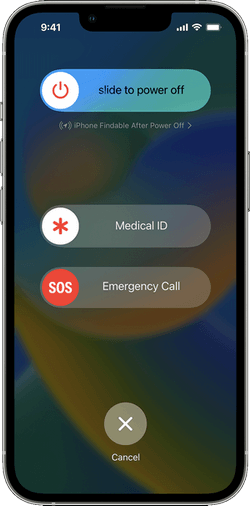
2. Restart iPhone
3. Temporarily disable Wi-Fi
To reactivate the Wi-Fi function, go to “Settings” > “Wi-Fi”, disable Wi-Fi, wait 30 seconds, and then enable it.
Another way to turn off Wi-Fi is to temporarily turn on Airplane Mode in Settings. To do so, activate “Airplane Mode” in the Settings app.
4. Do not use public Wi-Fi
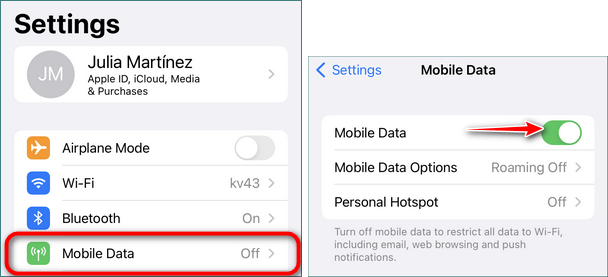
If you are on a public Wi-Fi network or on a restricted Wi-Fi network, such as at work, connect to a different Wi-Fi network. Or disable Wi-Fi functionality and use mobile communications instead.
To do so, go to Settings > Wi-Fi and turn off Wi-Fi connection.
Then go to Settings > Mobile Data and turn on Mobile Data.
5. Wait a few hours and retry
If the problem is on Apple’s side, or if it is a temporary Internet connection problem, you may be able to successfully update iOS after waiting a while and retrying.
6. Reset iPhone Network Settings
Resetting network settings removes all Wi-Fi networks, Wi-Fi passwords, and VPN settings from your iPhone.
NOTE: Make sure you remember the password for the Wi-Fi you are using before resetting your network settings. After resetting, passwords can be restored from backups only.
7. Disable content and privacy restrictions
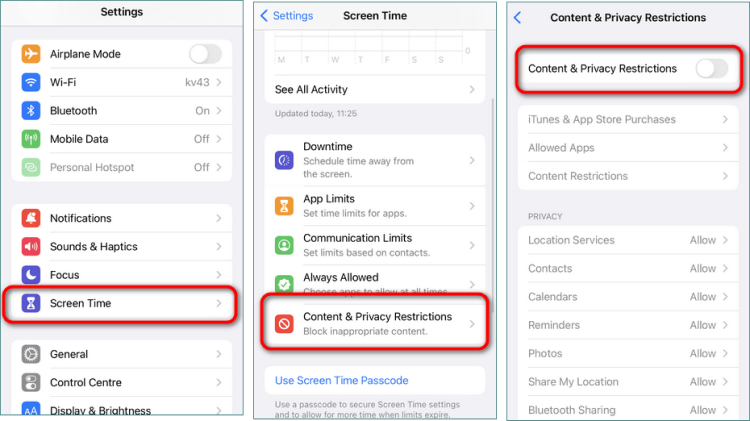
Another cause of the problem of not being able to download iPhone updates is the “Content and Privacy Restrictions” feature. If the feature is enabled, the operation of certain apps and services may be restricted.
To disable Content and Privacy Restrictions, go to the Settings app and select “Screen Time” > “Content and Privacy Restrictions”. Then disable “Content and Privacy Restrictions”.
8. Reset all settings
Resetting settings removes system settings, Wi-Fi network passwords, etc., but does not erase any data or applications stored on the iPhone.
9. iTunes update iPhone
If you are unable to update the software after resetting the network settings, try updating the software using iTunes. iTunes is not available on the iPhone alone and requires a PC. The following checks and preparations are required before performing the update.
- Make sure you have the latest version of iTunes on your PC
- Back up your iPhone just in case
- A Lightning cable for the phone is required
- PC needs to be connected to the Internet (not necessarily Wi-Fi)
Once you have a PC with the latest version of iTunes installed, you can begin the update process. The procedure is as follows. It takes time and effort to prepare, but if none of the other solutions work, you can also try updating using iTunes here.
- Connect your iPhone to your PC with the Lightning cable
- Launch iTunes
- Click on the iPhone symbol that appears in the upper left corner of iTunes
- Click on “Overview” from the menu on the left
- Click “Check for Updates” on the right (or “Update” or “Check for Updates”)
- Click “Download and Update
- Click “Update” when you get the following report
If you don’t know what to do if your iPhone is disabled connect to iTunes please follow the steps in our guide to fix the problem.
Measures to take when unable to check for update iPhone
If the update cannot be confirmed or verified, the following error message will appear.
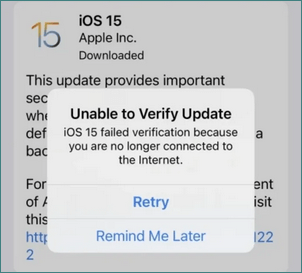
When iPhone stuck on verifying update, you can try the following measures.
1. Delete and re-download the update file
First delete the update downloaded to your iPhone. Then re-download the iOS update.
2. Free up space on the iPhone
Sometimes insufficient free space causes problems that cannot be checked or verified and your iPhone wont update. Please refer to “How to Increase iPhone Free Space” when free space is low.
3. Temporarily disable Wi-Fi
To reactivate the Wi-Fi function, go to “Settings” > “Wi-Fi”, disable Wi-Fi, wait 30 seconds, and then enable it.
You can also use Airplane Mode to turn off Wi-Fi. To do so, activate “Airplane Mode” in the Settings app.
4. Do not use public Wi-Fi
If you are on a public Wi-Fi network or on a restricted Wi-Fi network, such as at work, connect to a different Wi-Fi network. Or turn off the Wi-Fi functionality and use mobile communications instead.
To do so, go to Settings > Wi-Fi and turn off Wi-Fi connection.
Then go to Settings > Mobile Data and turn on Mobile Data.
5. iTunes update iPhone
If you are unable to update iOS on your iPhone, you can try updating using iTunes instead.
What to do if you cannot connect to the iPhone software update server
So, how to update my iPhone if I recieve som error messages?
If you get the following error message when updating your iPhone using iTunes, try the following measures.
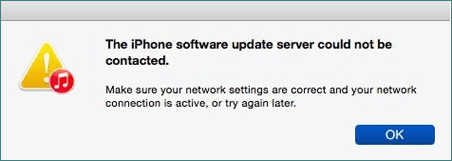
1. Restart iTunes
The cause of the “Cannot connect to iPhone software update server” message may be a problem with the iTunes server. So, first quit iTunes, wait for a while, and then start iTunes again. In some cases, this simple measure will solve the problem. If the error persists, I recommend the following measures.
2. Check network connection
If you cannot connect to the server, the error message will prompt you to verify that the network connection is active. How to do this is described below.
- Reboot the Wi-Fi router.
- Check the network connection.
- Connect to another network.
3. Update iTunes
Using an older version of iTunes may cause errors that prevent you from connecting to the server. Updating iTunes can solve the problem.
Update desktop version of iTunes:
- Launch iTunes.
- Click “Help” in the menu.
- Select “Check for Updates”. iTunes will then update automatically. Or you will get a notification saying “This is the latest version.
The Microsoft version of iTunes will automatically update when the latest version is released. If it is not updated, you can also check the Microsoft Store for iTunes updates.
4. Temporarily disable anti-virus
In some cases, anti-virus may block iTunes, so please try to temporarily disable your anti-virus. Or, manually add iTunes to the anti-virus exclusion list.
5. Manually download and install software
NOTE: Installing the update using this method will delete all contents of your iPhone. Please back up your data to avoid loss.
The last method is to manually download and install the IPSW file. This is not a recommended method as it is too difficult and time consuming. It can be done as a last resort if other solutions have not been effective.
- Download the IPSW file corresponding to the device you are using to your computer.
- Run iTunes and connect your iPhone with the USB cable.
- Click on the iPhone symbol.
- Click “Restore iPhone” and select the IPSW file you downloaded.
- Follow the iTunes instructions to update your iPhone.
- Restore iPhone data from backup.
Why cant I update my iPhone
How to deal with iOS update not finishing
Why won’t my iPhone update to iOS 15 or iOS 16 or any other versions? iPhone update times can be longer than expected. In general, updating from iOS 15 to iOS 16 takes longer than updating from iOS 15 to iOS 15.8. Usually, an update takes about an hour.
Why is the update taking too long?
- Downloading other files while downloading iOS (heavy videos, apps, etc.)
- Unstable internet connection
- System malfunction
Simple countermeasures:
- Wait about 1-2 hours before attempting any of the following measures. In most cases, the problem will be resolved by simply waiting.
- Avoid downloading other files or apps while downloading iOS. Avoid watching videos on online video services.
- Use a stable Wi-Fi network.
- Make sure you have enough free space on your iPhone.
- To improve the speed of updates, you can try increasing the amount of free space on your iPhone.
* If free space is low, delete unnecessary data. To learn how to increase space, please refer to How to free up iPhone space.
iPhone stuck on preparing update
When trying to install the latest iOS version, you might face common issue: your iPhone is stuck on “Preparing Update.” You may also see a message like “Checking for Update” that doesn’t go away. If the update doesn’t finish, and your iPhone won’t update no matter how long you wait, don’t worry — there are several ways to fix it.
Here’s how to troubleshoot the problem and finally get your iPhone updated.
1. Restart the iPhone
Before trying anything complicated, simply restart your iPhone. This often resolves temporary glitches that interfere with the update process. To do this, press and hold the power button (or power + volume on newer models), then slide to power off. Wait a few seconds, then turn it back on.
A quick restart might be all it takes to move past the “iPhone stuck on preparing update” screen.
2. Check Wi-Fi connection
Your iPhone needs a stable internet connection to download and prepare an iOS update. If your connection is weak or interrupted, the update may get stuck.
Here’s how to check:
- Open Settings > Wi-Fi
- Make sure Wi-Fi is turned on and connected to a reliable network
- If it’s off, enable it and reconnect to your Wi-Fi network
If you’re asking, “How do I update my iPhone?”, it starts with a strong and steady Wi-Fi connection.
Tip: Avoid public networks or hotspots that might have limited bandwidth or restrictions.
3. Reset iPhone network settings
Still stuck? A deeper issue with your iPhone’s network settings could be causing the problem. Resetting them can help — but be aware, this will remove all saved Wi-Fi networks, passwords, and VPN settings.
⚠️ NOTE: Make sure you remember the password for the Wi-Fi you are using before resetting your network settings. After resetting, passwords can be restored from backups only.
4. iTunes update iPhone
If you are unable to update iOS on your iPhone, you can try updating using iTunes instead.
Remaining time is being calculated and will not proceed
What should I do if I get the message “Calculating remaining time” and the update does not finish?
In this case, when your iPhone preparing update, we recommend waiting for about an hour at first. If the problem persists, proceed to the next step.
1. Check your Wi-Fi connection
If your Internet connection is slow or if there is a problem with your Wi-Fi connection, the download will take too long. If this is the case, you can try the following solutions.
- Reboot the Wi-Fi router
- Check the network connection
- Restart Phone
- Temporarily disable Wi-Fi
- Reset iPhone network settings
2. Retry after a few hours
Many users access the update servers at the same time, causing the servers to become unresponsive. So, if you try to update your iOS shortly after it is released, the update will take a long time to download. In this case, it is recommended to wait a few hours and try again.
3. Delete the update
If you encounter any problems while downloading iOS, you can delete the update file and try downloading it again.
4. Update iPhone using iTunes
Try updating your iPhone with iTunes.
How to cancel iPhone updates
Once the update is started, many users find it impossible to abort the update because there is no “cancel” button. Let’s find out if there is a way to do that.
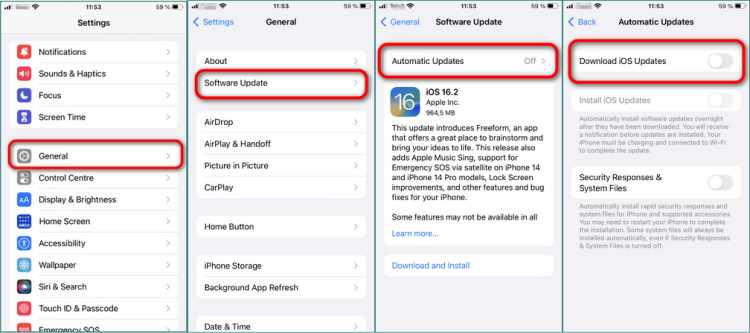
First, disable automatic updates so that the update will not install itself. That way, when the iOS download starts, it will not be installed automatically.
How to turn off automatic update on iPhone
Disable “Install iOS updates” under “Settings” > “General” > “Automatic updates”.
Can I stop the update during the installation process?
That is not possible. Once software installation has started, there is no way to stop it without damaging the device. Do not stop the installation process as you risk data loss.
However, there are two ways to stop the download of an iOS update!
-
Disable Wi-Fi and pause iPhone updates
The easiest way to pause the update is to disconnect your Internet connection. To do so, turn on Airplane Mode.
-
Delete iPhone updates
It is possible to delete the downloaded iOS update files; if you do not want to update your iPhone, follow these steps to delete the update
- Open the Settings app and go to General > iPhone Storage to find your iOS files.
- Select iOS Update and tap “Remove Update”.
- Then confirm the deletion.
Why wont my iPhone update
FAQ
Why won’t my iPhone update to iOS?
If your iPhone won’t update to the latest version of iOS, it could be due to several reasons including insufficient storage space, network issues, or a problem with the iOS update itself. It’s essential to ensure that you have enough iPhone storage available, as updates require a certain amount of free space to download and install. Additionally, check that your internet connection is stable, as a weak connection may hinder the update process.
How do I check for updates on my iPhone?
To check for update on your iPhone, go to Settings > General > Software Update. Here, your device will automatically search for any available iOS updates. If a new update is available, you will see the option to download and install it. If your iPhone is already running the latest version of iOS, you will see a message indicating that your software is up to date.
What should I do if my iPhone says ‘Unable to check for update’?
If you encounter the message ‘unable to check for update’, it usually indicates a connection issue or a problem with the Apple server. To resolve this, first, ensure that your iPhone is connected to a stable Wi-Fi network. You can also try restarting your iPhone, as this may fix the connectivity issue. If the problem persists, check Apple’s system status page to see if there are any outages affecting iOS updates.
How can I free up storage space for an iOS update?
To free up storage space on your iPhone for an iOS update, go to Settings > General > iPhone Storage. Here, you can see a list of apps and their storage usage. You may consider deleting unused apps, large files, or offloading photos to iCloud. Here is a detailed guide on how to free up iPhone space.
iPhone won’t update
Final Thoughts:
Running into update problems is not what you are waiting from Apple — especially when your iPhone keeps showing messages like “Unable to check for update” or seems to be stuck forever. If you’ve been wondering, “Why won’t my iPhone update?”, we hope this guide helped you identify the root cause and provided the right solution.
Sometimes the fix is simple, like restarting your device or checking your Wi-Fi connection. In other cases, you may need to reset your network settings or try updating via iTunes. Either way, the steps in this article are designed to cover all common reasons why an iOS update fails and help you get things back on track.
And if you’re asking yourself, “How long does an update take?” — the answer is: it depends. Most updates take about 15–30 minutes once downloading begins, but delays in preparing or verifying the update usually point to a connectivity or system issue — which we’ve addressed above.
Next time you’re stuck, come back to this page — it’s your go-to resource for fixing any issue related to iOS updates. And if your iPhone still won’t update after all this, there’s likely a deeper issue that may require Apple Support.
Got the update to work? Great! You’re now ready to enjoy the latest iOS features.
CopyTrans 7 Pack
Special offer
CopyTrans 7 Pack is a bundle of simple apps for a better iPhone + Windows experience. Transfer photos between iPhone and PC, export and import contacts, manage iCloud photos, back up and restore iPhone, and much more…!
✅ Manage 5 devices;
✅ Full iPhone management;
✅ No subscription;
✅ 108$ off.
* The offer includes an additional 3$ discount and is only valid when purchasing CopyTrans 7 Pack for private use.
