and easily manage your iPhone
For all your devices
CopyTrans Contacts
The fast and easy way to organize, edit, back up and transfer iPhone contacts, calendars, and more. Get full control over sensible iPhone data and manage it directly on your PC. Transfer contacts and calendars from iPhone to Windows, Outlook, Gmail, Android, Blackberry, etc. Save iPhone text messages and notes to your computer, or manage iCloud data on your PC.
CopyTrans Photo
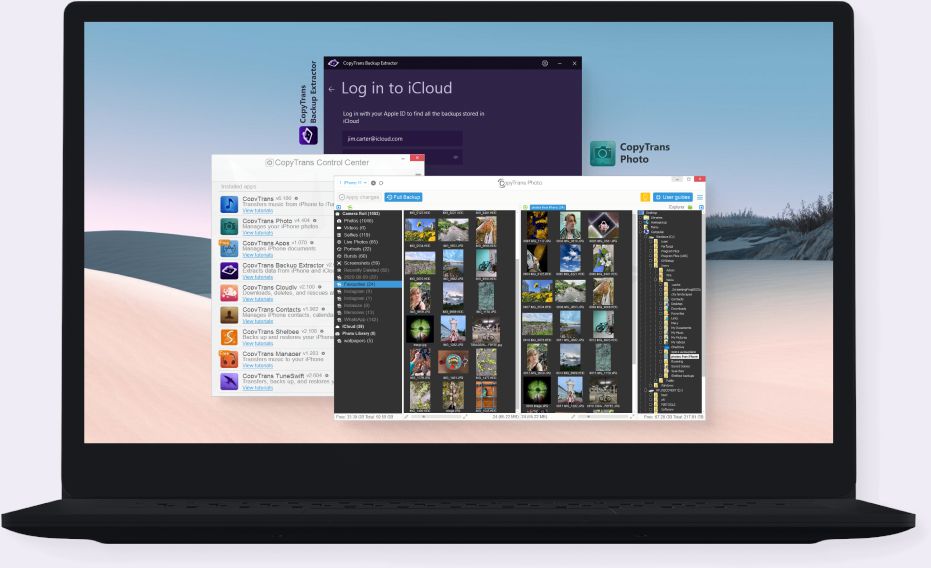
CopyTrans Photo is a simple solution to transfer and manage pictures and videos between iPhone, iPad, and PC. Easily drag and drop pictures and videos from your PC to your iPhone, iPad or iPod and create or edit photo and video albums on your iDevices. Copy pictures from iPhone, iPad, and iPod to your computer or back up videos to an external drive.
CopyTrans Shelbee
A simple and powerful solution for iPhone backup and restore without iTunes. Use CopyTrans Shelbee to backup iOS data to a PC including iPhone apps and app documents, messages, contacts, calendars, Camera Roll, and more. Quickly restore your entire iPhone or choose which data you want to restore: you can restore only photos, contacts, messages, WhatsApp, or any other app data you have in your backup.
CopyTrans
The easy solution to transfer songs, videos, playlists from iPad, iPod, and iPhone to PC and iTunes. Using the “Smart Backup” feature, you will fill up your iTunes library with one click and keep it 100% free from duplicates. If you wish to back up your iPhone or iPod music to PC using individual folder structure or to copy only specific files to iTunes, go for the “Manual Backup”.
The free iTunes Alternative to manage iPhone, iPad, and iPod without iTunes. Use CopyTrans Manager to add songs, videos and more to your iPhone. Add and manage playlists and artwork, or change ID3 Tags such as artist, album, rating etc. The best of all? CopyTrans Manager is portable, 100% free and it supports all iPhones, iPads and iPods.
The smart and simple way to use your iPhone as a USB flash drive. A free tool, CopyTrans Filey will help you transfer movies, eBooks, work documents and more between your iPhone and computer. The app supports wireless connection as well as drag-and-drop data transfer. Adding files to iOS apps from a Windows computer has never been easier.
For your iPhone backups
Backup Extractor
CopyTrans Backup Extractor allows you to recover data from backups created with iTunes, iCloud, or third-party software. Even if your iPhone is lost or broken, it is still possible to extract your contacts, photos, calendars, WhatsApp messages and other data to your computer – you don’t even need a device for that. CopyTrans Backup Extractor will find all the backups on your PC or in iCloud automatically. You will then be able to extract different types of data to your computer as well as move or delete your backups.
For iCloud
CopyTrans Cloudly
CopyTrans Cloudly is a fast and easy app that lets you delete all photos and videos from your iCloud account as well as download all photos and videos from iCloud to PC – both in just one click. Bonus: you can also retrieve some of the photos and videos you accidentally deleted!
For iTunes
CopyTrans TuneSwift
CopyTrans TuneSwift is the easy way to save, restore and transfer your entire iTunes library. Copy iTunes from a PC to a PC or perform full and incremental backups of your iTunes library.
More apps
Drivers Installer Free
If you want to use an iPhone, iPad or iPod Touch without iTunes, our free CopyTrans Drivers Installer is the right tool for you. It automatically installs all drivers that are needed for an Apple device to be recognized by a PC. No need for iTunes!
for Windows Free
CopyTrans HEIC for Windows is a free plugin that allows you to view HEIC and HEIF photos on Windows, as well as convert them to JPG with a simple right-click.